365 Security Assessment finds the M365 gaps your MFA doesn't cover.
The leading SSPM for Microsoft 365 teams that need answers before audit, renewal, or incident response.
12 compliance frameworks · 42 audit-ready reports · Attack-path graph · Live evidence drawer
No agent. No tenant changes. Free 14-day trial.
You don't know which ones. We do.
A SaaS Security Posture Management (SSPM) platform purpose-built for Microsoft 365 + Azure. 14 minutes to first finding. No agents. Read-only. 14-day free trial.
Built by 4× Microsoft Solutions Partner. SOC 2 in progress. No credit card required.
Answer first
Short answer
SSPM for Microsoft 365 built for posture assessment across M365 and Azure. Find misconfigurations, prioritize remediation, and produce executive-ready reports.
365 Security Assessment surfaces Microsoft 365 and Entra ID configuration gaps across identity, mail, collaboration, admin access, and security-control areas.
- Who it helpsMicrosoft 365 admins, cloud security teams, and IT leaders
- What you getA posture view that connects control gaps to actionable remediation
- Next stepView sample report
Why This Matters Now
The market isn't waiting. Regulations, insurers, and threat actors are all converging on M365 security.
Had M365 Incidents
of large organizations experienced a security or compliance incident caused by M365 misconfiguration in the past 12 months.
Source: CoreView, 2025
SSPM Market by 2030
The SaaS Security Posture Management market is growing at 48.7% CAGR — one of the fastest-growing cybersecurity categories.
Source: Frost & Sullivan
Federal M365 Mandate
CISA now requires all federal agencies to secure M365 environments. Cyber insurers are following suit with coverage requirements.
Source: CISA, Dec 2024
What we stop, before it stops you.
Seven misconfiguration patterns we see in real M365 + Azure tenants. Each one has been the entry point for documented breaches by named attackers.
The MFA Group Gap
A Fortune 500 retailer had 45,000 identities. Their MFA enforcement group only contained 8,000 users. Attackers walked in through one of the other 37,000.
The Forgotten Admin Endpoint
Exchange Online PowerShell connects with admin credentials from any IP. Conditional Access doesn't apply by default. A stolen credential becomes a tenant administrator without ever touching the GUI.
The Consent You Forgot You Gave
A user clicked "Allow" on a phishing app pretending to be a Microsoft tool. The app reads mail, sends mail, and accesses OneDrive — no password, no MFA prompt.
Tied to: Microsoft Storm-0558, Midnight Blizzard
The Legacy Door Left Open
SMTP, IMAP, and POP3 stayed enabled for "compatibility". Modern auth was MFA-protected. Legacy auth wasn't. Attackers authenticated via SMTP and never saw a prompt.
The Permanent Global Admin
Fifteen people had Global Admin permanently. Privileged Identity Management was never enabled. One compromised credential equaled full tenant takeover.
Tied to: Scattered Spider, LAPSUS$
The Sharing That Never Expired
Default tenant sharing was "Anyone with link". 380 documents had been shared externally without expiration. Half the recipients no longer worked at partner companies.
The Audit Trail That Aged Out
Default 90-day log retention. The breach was discovered six months after initial access. The forensic trail was gone. Investigators couldn't identify patient zero.
How It Works
From connection to remediation in three simple steps. No agents to install, no changes to your environment.
Connect
Sign in with your Microsoft account and grant assessment permissions. Takes just 2 minutes with our guided setup.
- Microsoft-only authentication
- Read-only access only
- No agents or software
Scan
Our engine analyzes 12,000+ tenant signals across M365 & Azure against deep expert-curated security checks built from real-world enterprise audits. Results in minutes.
- 200+ security modules
- MITRE ATT&CK mapped
- Real-time progress updates
Remediate
Get prioritized findings with copy-paste PowerShell remediation scripts. Track improvement over time with continuous monitoring.
- Prioritized by risk
- Copy-paste scripts
- Drift detection alerts
Enterprise Security, Simplified
From identity misconfigurations to data exfiltration risks, we detect threats that other tools miss.
AI Correlation Engine
We don't just list settings. We map relationships between them. A "Low" finding in Exchange becomes "Critical" when paired with a specific Conditional Access exemption.
Email & Threat Intelligence
50+ Exchange threat intelligence feeds: ATP reports, zero-hour auto purge, compromised user detection, DLP violations, safe links/attachments analysis, mail flow anomalies, and sensitivity label enforcement.
Data Protection
Find SharePoint oversharing, anonymous links, DLP policy gaps, and sensitive data exposure risks including external guest access.
Audit & Compliance
Map to NIST, CIS, ISO 27001, SOC2, GDPR, HIPAA, PCI-DSS, FedRAMP, HITRUST, and CMMC with evidence collection for audit readiness.
AI-Powered Insights
Get executive-friendly explanations, risk quantification, and prioritized remediation guidance with copy-paste PowerShell scripts.
Enterprise Scale
Purpose-built for large organizations. Assess 100,000+ user tenants with optimized performance and parallel processing across 200+ security modules.
Why We're Different
Other tools check the surface. We perform forensic analysis across your entire Microsoft ecosystem.
Microsoft Secure Score
Surface-level recommendations
- Only covers Microsoft-recommended settings (~200 checks)
- No correlation between services
- Limited Azure coverage
We pull Secure Score and Azure Security Score for a unified view—then go 55x deeper.
Manual Audits
Time-consuming & expensive
- 120+ hours at $180/hr = $21,600 per assessment
- Only ~300 datapoints checked
- Point-in-time, no continuous monitoring
We automate what took 120 hours into 45 minutes—then monitor continuously.
Leading CSPM/CNAPP Platforms
Cloud-only coverage
- Check ~200 M365 settings at most. We analyze 12,000+ tenant signals across every workload.
- Miss Exchange, SharePoint, Teams security
- Typically $15K–$97K/year
We're the only tool that covers both M365 and Azure with deep security checks.
365 Security Assessment
Forensic M365 & Azure analysis
- 12,000+ tenant signals across M365 & Azure
- Deep expert-curated rules with MITRE ATT&CK mapping
- Attack path analysis showing exploit chains
- Continuous monitoring with drift detection
Starting at $2,497/month—47x deeper than manual audits.
Calculate Your Risk Exposure
See how much a security breach could cost you—and how much you save with continuous monitoring.
Save $12K annually vs. manual assessments while getting 47x more coverage.
Start Your AssessmentBeautiful, Actionable Dashboards
From executive summaries to deep-dive analysis — 18 specialized modules give you visibility at every level.
Map to 10 Major Frameworks
Instant compliance mapping with gap analysis and evidence collection for audit readiness.
Proof you can verify
Named customer quotes will be published only when they are real, approved, and attributable. Until then, judge the product from evidence you can open.
Sample report
See the deliverable
Open the public sample report before connecting a tenant. Executive summary plus technical evidence — no composite quotes.
View sample reportMicrosoft Marketplace
Paid plans are live
Transact on Microsoft Marketplace. Start with the 14-day free trial; no credit card required for trial.
Get Started on Microsoft MarketplaceBuilder
4x Microsoft Solutions Partner
Built by Bonelli Systems, a 4x Microsoft Solutions Partner. Read-only assessment. No agent. No tenant changes.
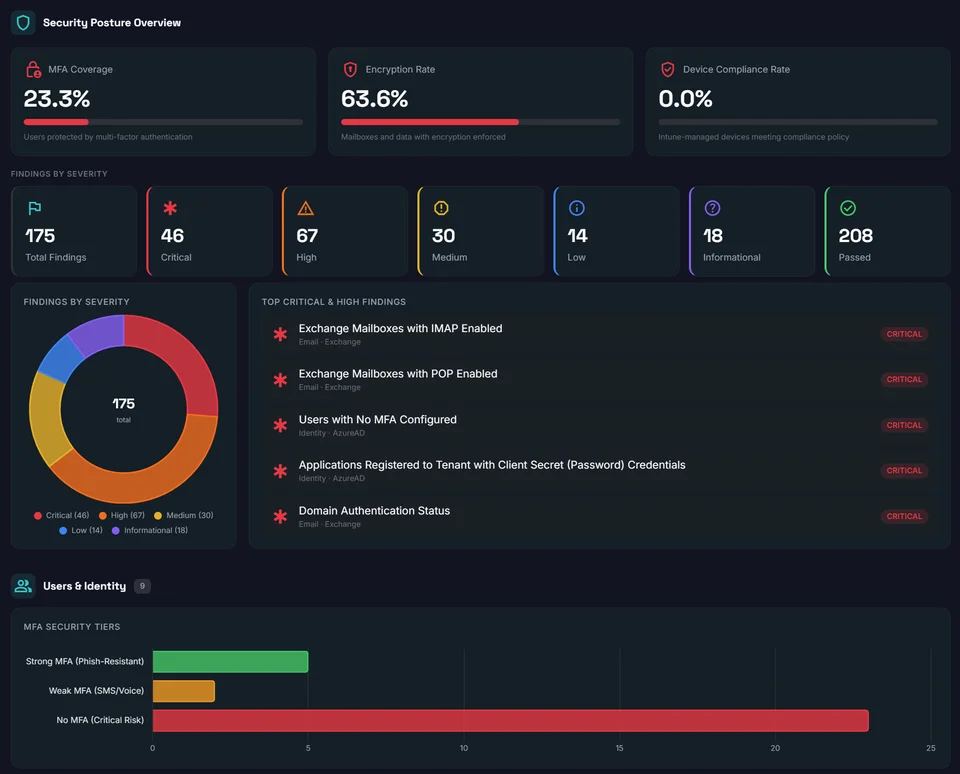
Trust & securityProduct UI
Real scan interface
Homepage screenshots are the current dashboard, not stock art. Walk the findings, evidence drawer, and reporting path on a trial tenant.
Start free 14-day trialBuilt for security teams in these environments
Paid access is live
Paid plans are live on Microsoft Marketplace.
Start with the free trial today, or get paid plans on Microsoft Marketplace.
Built by a 4x Microsoft Solutions Partner. Read-only assessment. No agent install. No credit card required for the free trial.
Paid plans are live on Microsoft Marketplace. Free trial remains available.
Enterprise-Grade Security
Purpose-built for organizations serious about M365 and Azure security.
- 1,000 Users max
- 1,000 Mailboxes
- 1,000 Teams / SharePoint Sites
- Top 100 Critical Rules
- Executive Summary Dashboard
- Engineering Summary Dashboard
- Security Recommendations Dashboard
- Azure Coverage
- All Deep Security Coverage
- Full M365 + Azure Coverage
- Executive + Technical Summaries
- Copy-Paste Remediation Scripts
- 30-Day Dashboard Access
- 3 Compliance Frameworks (CIS, NIST, SOC2)
- All Deep Security Coverage
- Full M365 + Azure Coverage
- Continuous Drift Detection
- Weekly Automated Scans
- Historical Trend Analysis
- Copy-Paste Remediation Scripts
- 3 Compliance Frameworks (CIS, NIST, SOC2)
- Everything in Guard, plus:
- All 12 Compliance Frameworks
- MITRE ATT&CK Threat Mapping
- Executive Board-Ready Reports
- On-Demand Scan Scheduling
- Priority Support (SLA-Backed)
- Per-tenant pricing (not per-seat) — scales economically at enterprise size
- Dedicated Customer Success Manager + onboarding engineering
- Custom rule additions for your compliance program
- SSO + scoped role assignments + audit-log review
- Optional Azure resource coverage + GovCloud / EU region targeting
Frequently Asked Questions
Everything you need to know about 365 Security Assessment
Our assessment is read-only by design. We request the minimum Microsoft consent permissions required to read your tenant's security configuration. No settings are changed, no emails are sent, and no files are modified.
Our assessment only collects data. No settings are changed, no emails are sent, and no files are modified. Your data is encrypted at rest with AES-256 and in transit with TLS 1.3.
You'll see initial results within minutes as we prioritize the most critical checks first. The complete scan analyzing all 12,000+ tenant signals typically takes:
- Small organizations (<500 users): 15-30 minutes
- Mid-size (500-5,000 users): 30-60 minutes
- Enterprise (5,000+ users): 1-3 hours
Subsequent scans are much faster since we only track changes from your baseline. Microsoft throttling policies can occasionally extend scan times for very large tenants.
We request the minimum Microsoft consent permissions required to read your tenant's security configuration across Microsoft 365 and Azure. All access is read-only — our audit collects evidence, never changes settings.
- • Read-only access to your identity, device, and security policy configuration
- • Read-only access to your email, SharePoint, and Teams security settings
- • Read-only access to your Azure resource configuration
- • Directory roles required to read security-sensitive properties
During onboarding, we provide a pre-populated Microsoft consent URL with all required permissions for one-click admin approval. Our assessment only collects data — no changes are ever made to your environment.
Your security data is stored in Azure with enterprise-grade protection:
- AES-256 encryption at rest for all data
- TLS 1.3 for all data in transit
- Encryption keys stored in Azure Key Vault, isolated from application data
- Private endpoints—no public internet access to storage
Raw scan data is retained for 30 days in hot storage, then moved to encrypted archive. You can request complete data deletion at any time. We're currently pursuing SOC 2 Type II certification.
We go 120x deeper. Microsoft Secure Score checks approximately 200 recommended settings. We analyze 12,000+ tenant signals across 242 security modules covering:
- Exchange Online (4,030 rules)
- Microsoft 365 identity & collaboration (5,609 rules)
- Azure Resources (4,593 rules)
- Entra ID (2,362 rules)
- SharePoint, Teams, PowerApps, and more
We also pull your Secure Score and Azure Security Score for a unified view—then correlate findings across services to identify attack paths Microsoft doesn't detect.
Yes. The 365 Security Assessment partner program is built for System Integrators, MSPs, and Microsoft-focused service providers.
- Flat 20% referral path on qualifying paid subscription referrals
- Assessment-led prospecting motion for Microsoft 365 clients and prospects
- Co-branded report templates
- Every finding = remediation revenue for your team
Referral eligibility and payout timing are confirmed in the partner agreement before launch.
to learn more about becoming a 365 Security Assessment channel partner.
Because the product sells itself. MSPs who scan 3+ tenants see exactly what the full platform does — and upgrade when their clients demand more. We're betting on the product, not the pitch.
Most tenants surface their first critical finding within 14 minutes of consent. The full assessment completes in well under an hour for SMB tenants and within a few hours for enterprise tenants with thousands of users — no agent installation, no infrastructure to configure.
Defender XDR is excellent at detection and response — finding threats after they enter. We're a posture audit — finding the configuration gaps that let threats in to begin with. E5 customers consistently fail audits because nobody is checking their tenant configuration against deep security checks and 12 compliance frameworks. We complement Defender, we don't replace it.
Yes. MSPs and multi-entity organizations can run assessments across an unlimited number of tenants on paid plans. The MSP Multi-Tenant dashboard rolls findings up into a single view so you can prioritize remediation work across customers — useful for both internal IT teams managing acquisitions and MSPs serving many clients.
Your assessment data, scanner application registration, and report history are preserved. You can upgrade in-app at any time to resume full access — your historical evidence comes with you. We do not delete anything at trial expiry; the view simply becomes read-only locked until upgrade.
No. Your evidence is yours. We process it solely to generate your assessment reports. We do not sell, share, or use customer evidence for AI training. Aggregate anonymized statistics (e.g., "X% of tenants miss MFA enforcement") may inform our annual industry reports, but never with customer-identifying detail.
Ten frameworks: CIS Microsoft 365 Foundations Benchmark, CMMC 2.0 (Levels 1 and 2), FedRAMP Moderate and High, GDPR, HIPAA Security Rule, HITRUST CSF, ISO 27001/27017/27018, NIST SP 800-53 Rev 5, PCI-DSS v4.0, and SOC 2 Type II Trust Services Criteria. Every finding carries the specific control number from each relevant framework so auditors accept your evidence directly.
Three deliverables: an executive summary dashboard (board-ready), an engineering summary dashboard (remediation-ready), and a compliance evidence pack (auditor-ready). All three are exportable to PDF, viewable in-app for continuous monitoring, and tagged with MITRE ATT&CK technique IDs for the highest-priority findings.
Still have questions?
Ready to See What Others Miss?
Book a personalized demo and discover security gaps in your M365 and Azure environment.
New product surfaces